

Take the First Step Toward Cybersecurity Excellence
Why Nexusguard?

Over 15 Years

Trusted by 100+

Protecting 50,000

40+




Learn More About Nexusguard Academy Courses
Let’s Start the Conversation
Why Nexusguard?
Over 15 Years
Trusted by 100+
Protecting 50,000
40+
Get in Touch with Our Experts
Let’s Start the Conversation
Why Nexusguard?
Over 15 Years
Trusted by 100+
Protecting 50,000
40+
Let’s Start the Conversation
Why Nexusguard?
Over 15 Years
Trusted by 100+
Protecting 50,000
40+
9 Devices in Your Office Right Now That Could Be in a Botnet


Donny Chong
Nexusguard
Share to:
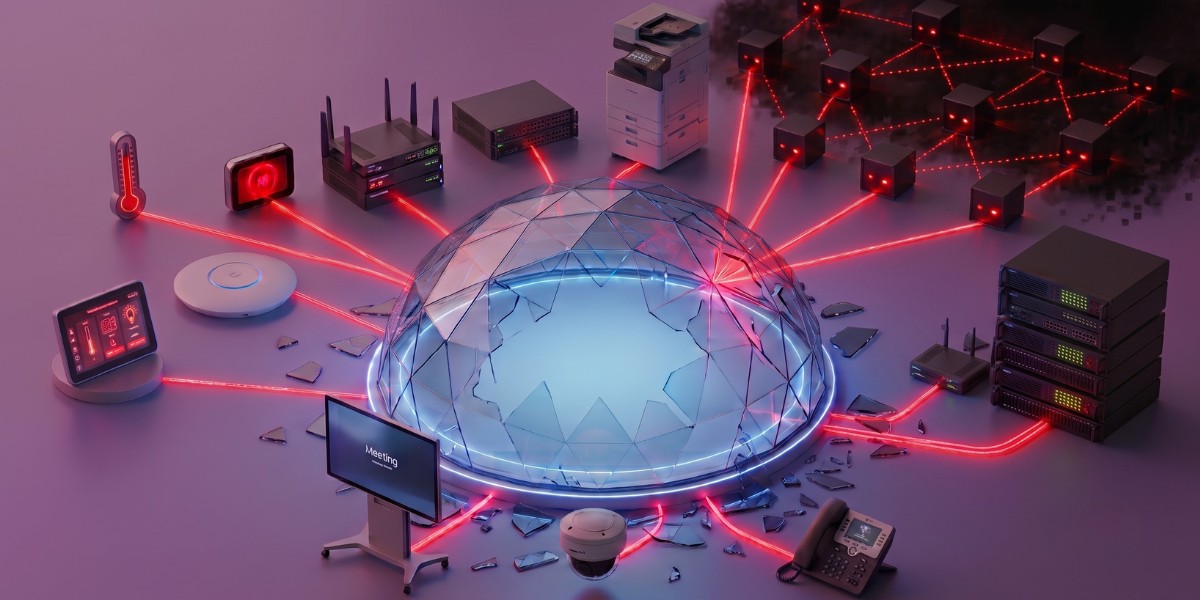
The record-breaking DDoS attacks of the last year weren’t powered by hackers’ supercomputers. They ran on ordinary office gear, the printer, the camera, the box nobody remembers buying. Here’s how to find yours before someone else uses them
You think of a botnet as something far away. A dark room, a hoodie, servers humming in a country you can’t spell.
It isn’t.
Recent threat intelligence reports have tracked botnets running on between 1 and 4 million ordinary connected devices. Routers. Cameras. Android TV boxes. The stuff in your supply closet right now.
We see this from the defense side every week. The traffic hammering a bank in Jakarta traces back to a coffee shop’s camera in Osaka and a law firm’s printer in Sydney.
So here’s the uncomfortable question this article answers for you. Which of your office devices is already enlisted, and how do you find it? Below are the nine we catch most often, ranked by how badly they get abused, each with why attackers want it, the sign it’s compromised, and what to do today.
1. The office router or gateway (Risk: Critical)
Start here, because this is where it almost always starts.
Your router is online 24/7, rarely rebooted, and nobody on staff “owns” it. That’s the exact profile attackers hunt for. The Aisuru-Kimwolf botnet behind the 2026 record fed largely on compromised routers, devices running firmware three or four years past its last patch.
Here’s the part that stings. Most office routers ship with a default admin password, and a shocking number never get changed. Attackers don’t need to be clever. They run a script that tries admin/admin against millions of IPs and waits.
The tell: internet that’s mysteriously slow during off-hours, or a router that runs hot and reboots itself.
What to do: change the default credentials today, kill remote admin access from the public internet, and update the firmware. If the router is older than five years and no longer gets updates, replace it. That’s not upselling, that’s hygiene.
2. IP security cameras and CCTV (Risk: Critical)
The irony writes itself. The camera you installed for security is the single most-abused device class in the botnet world.
The original Mirai botnet, the one that took down half the US internet in 2016, was built mostly on hijacked cameras and DVRs. A decade later, nothing has changed. Cheap IP cameras run stripped-down Linux, sit exposed on the network, and get firmware updates roughly never.
Why attackers love them: always on, real bandwidth, and owners who log in once during installation and never again.
A camera doesn’t act “hacked.” It keeps showing you the parking lot. Meanwhile it’s quietly throwing 50,000 requests a second at a target on the other side of the planet.
The tell: the camera feed lags or drops while everything else on the network is fine, its upload is busy doing something else.
What to do: put cameras on their own network segment, away from anything that matters. Change every default password. If a camera can’t be updated and can’t be segmented, it shouldn’t be on your network.
3. Network printers and copiers (Risk: High)
Nobody thinks about the printer. That’s precisely the problem.
A modern office copier is a full computer, operating system, hard drive, network stack, and usually a web interface that’s been on default settings since delivery day. It prints. It scans. And on a bad day, it throws junk traffic at a DDoS target between print jobs.
The most dangerous device on your network is the one no one has logged into since installation.
We’ve traced attack traffic back to office multifunction printers more than once. The owner is always stunned. “It’s a printer.” Right, a printer with a 1 Gbps connection and firmware from 2021.
The tell: the printer’s network light flickers constantly even when no one’s printing.
What to do: disable the printer’s internet-facing services if you’re not using them (most offices aren’t). Lock the admin panel behind a real password. Ask your managed-print vendor when it last pushed firmware, if they go quiet, that’s your answer.
4. VoIP desk phones (Risk: High)
The phone on the desk is a Linux device with a network cable. You forget that, because it just looks like a phone.
VoIP handsets get provisioned once, then run untouched for years. Many expose a web config page. Plenty ship with default PINs. They’re a quiet, stable, always-connected platform, everything a botnet operator wants in a recruit.
Why this one’s sneaky: phones are often managed by a telecom vendor, not IT. So nobody internal watches the firmware, and the vendor assumes you’d flag a problem. Both sides assume the other has it covered. Neither does.
The tell: call quality drops or phones reboot mid-call, a sign the handset’s CPU is busy with traffic that isn’t yours.
What to do: find out who actually patches your phones, and confirm they’re doing it. Change default credentials on the handsets and the PBX. Segment voice from data, good for security, good for call quality too.
5. Conference displays and smart TVs (Risk: High)
That big screen in the meeting room runs Android. So does the one in the lobby. And Android TV devices were a primary fuel source for the 2025–2026 record attacks.
Smart TVs and streaming boxes are computers that happen to show video. They have app stores, persistent connections, and update cycles measured in “whenever the manufacturer feels like it.” A surprising number run forked, abandoned Android builds that stopped getting security patches the day they shipped.
The display shows your quarterly numbers in the standup. After hours, it might be doing something else entirely.
The tell: the TV’s network usage stays high overnight, or it’s slow to wake because it’s been busy.
What to do: if a screen doesn’t need internet, most conference displays don’t, they just mirror a laptop, take it off the network. For the ones that do, put them on a guest or IoT VLAN, never the corporate network.
6. Network video recorders and DVRs (Risk: High)
The box that stores your camera footage is its own problem, separate from the cameras.
NVRs and DVRs are designed to be reachable from anywhere, that’s the selling point, “watch your office from your phone.” To make that work, they punch holes in your firewall. Sometimes automatically via UPnP, sometimes because an installer opened a port and forgot.
Either way, you’ve now got a powerful, always-on Linux box exposed to the entire internet.
Convenience and exposure are the same setting. You just get to choose what you call it.
These devices were core to Mirai and they’re core to today’s botnets. The attack surface hasn’t shrunk in ten years. If anything, there are more of them.
What to do: kill UPnP on your firewall. Close any ports opened for remote camera access and use a VPN instead. Audit what’s actually reachable from outside, you’ll likely find something you never authorized.
7. Smart building systems, HVAC, badge readers, lighting (Risk: Medium)
This is the category that makes IT teams go pale, because they often don’t know what’s connected.
Building management runs on a sprawl of networked controllers: the thermostat, the access-control panel at the front door, the smart lighting, the elevator system. A building contractor installed them, not your IT team. They phone home for “remote management.” And almost nobody patches them.
The ownership gap is the vulnerability. IT thinks facilities owns it. Facilities thinks the contractor owns it. The contractor finished the job in 2022 and moved on. So the badge reader at your front door sits there, fully connected, fully forgotten, fully exploitable.
What to do: inventory every building system that touches your network, you can’t protect what you don’t know exists. Get them on an isolated network. Pin down, in writing, who owns their security updates.
8. Wi-Fi access points and range extenders (Risk: Medium)
The little white pucks on the ceiling, and the cheap extender someone bought to fix the dead spot in the back office. Both count.
Access points are routers by another name, same firmware risks, same default-password problem, same tendency to run for years without an update. Consumer range extenders are worse, because they’re bought ad hoc, plugged in by whoever, and never registered with IT at all.
That extender in the corner is the definition of shadow IT. On your network, outdated firmware, no record it exists.
What to do: standardize on managed access points your team actually updates. Hunt down and remove rogue consumer extenders. If someone needs better coverage, solve it properly instead of letting a $30 box become your weakest link.
9. The “smart” stuff nobody approved (Risk: Medium)
The break-room fridge with an app. The smart speaker someone brought from home. The Wi-Fi coffee machine. The aquarium thermometer, yes, a casino once got breached through a fish tank.
Individually, each one is almost funny. Collectively, they’re a botnet starter kit sitting inside your perimeter. Every one is a tiny, unpatched, internet-connected computer that nobody owns. And they multiply, quietly, as employees bring their lives to work.
Every device that joins your network without a plan is a device an attacker gets for free.
What to do: write a one-line policy, nothing personal or “smart” joins the corporate network without approval. Stand up a separate guest network for the unavoidable stuff. Then actually look at what’s connected; the list is always longer than anyone guesses.
Check it right now: the 5-minute office sweep
You don’t need a security budget to do this today. Open your router’s admin page and walk the list.
- Pull the connected-device list. Anything you can’t name is a problem. Investigate every unknown.
- Watch for off-hours traffic. A device pushing data at 3 a.m. when the office is empty is the loudest red flag there is.
- Check for open ports. UPnP on, or ports forwarded to a camera or DVR? Close them.
- Hunt default passwords. Try logging into each device with the factory credentials. If it works, so can an attacker.
- Note what can’t be updated. Anything past end-of-life either gets segmented off or unplugged.
If that sweep turns up devices you didn’t know were online, you’re not unusual. That’s the normal starting point. The point is to look.
What this actually adds up to
Here’s the truth underneath all nine: your office isn’t a likely target of a DDoS attack. It’s a likely weapon in one.
That changes the job. You’re not just defending your own uptime, though a hijacked device will quietly eat your bandwidth and tank performance. You’re making sure your gear isn’t the thing that takes down a hospital or a bank in another country.
From where we sit, watching this traffic land, that’s not hypothetical. It’s Tuesday.
The fixes aren’t expensive or exotic. Change default passwords. Segment your network so a compromised camera can’t reach anything that matters. Patch what you can, retire what you can’t. Know what’s connected. Do that, and you drop off the easy-target list, because botnet operators run scripts at scale, picking up whatever’s lying around unlocked.
This is the half of the problem most people miss. Everything above is about the attacks your devices launch. The other half is what lands on your front door.
When a botnet like Aisuru points a few million devices at your network, no amount of in-house hardening absorbs 31 Tbps. That has to be scrubbed upstream, before it reaches you.
It’s the same fight from the other side, and it’s what Nexusguard’s Origin Protection is built for, rerouting attack traffic to global scrubbing centers via BGP and handing clean traffic back, while Application Protection catches the sneakier Layer 7 hits these botnets increasingly throw.
So go count your devices. The number will be higher than you think, and that’s the whole point.
FAQ
How do I know if an office device is part of a botnet?
Watch for unexplained network activity during off-hours, devices running hot or rebooting on their own, and internet that slows for no clear reason. The cleanest check is your router’s connected-device list, anything you can’t identify, or any device pushing traffic when the office is empty, deserves immediate investigation.
Which office devices are most likely to be hijacked?
Routers, IP cameras, DVRs, and network printers top the list, because they stay online constantly, run outdated firmware, and often keep their factory passwords. Smart TVs, VoIP phones, and unmanaged IoT gadgets follow close behind. Anything internet-connected that nobody actively maintains is a candidate.
Can my router really be recruited into a botnet?
Yes, routers are among the most targeted devices on earth. They run 24/7, rarely get patched, and frequently keep their default admin password. Attackers scan the internet for these credentials at massive scale. Changing the password and updating firmware removes you from the easy-target pool immediately.
How do I remove a device from a botnet?
Disconnect it from the network first, then update its firmware to the latest version and perform a factory reset to clear any malware. Change all credentials before reconnecting. If the device can’t be updated or reset cleanly, the safest move is to replace it rather than risk reinfection.
What’s the difference between a botnet and a DDoS attack?
A botnet is the network of hijacked devices an attacker controls. A DDoS attack is one thing they do with it, pointing all those devices at a target to flood it with traffic. Your office device is the foot soldier; the DDoS attack is the battle it gets conscripted into.
Does antivirus or a VPN stop my devices being recruited?
Not on their own. Most IoT devices, cameras, printers, routers, can’t run antivirus at all, and a VPN won’t fix a default password or unpatched firmware. The real defenses are basic: change credentials, update firmware, segment your network, and remove devices that can no longer be secured.
Protect Your Infrastructure Today


Related Articles
.avif)
The Most Overlooked Critical Infrastructure of the Internet

Botnets go wireless
